



Every vendor gets their own link.
Their notes, their hours and the key times. Free for vendors.
Demo wedding. Free forever for vendors.
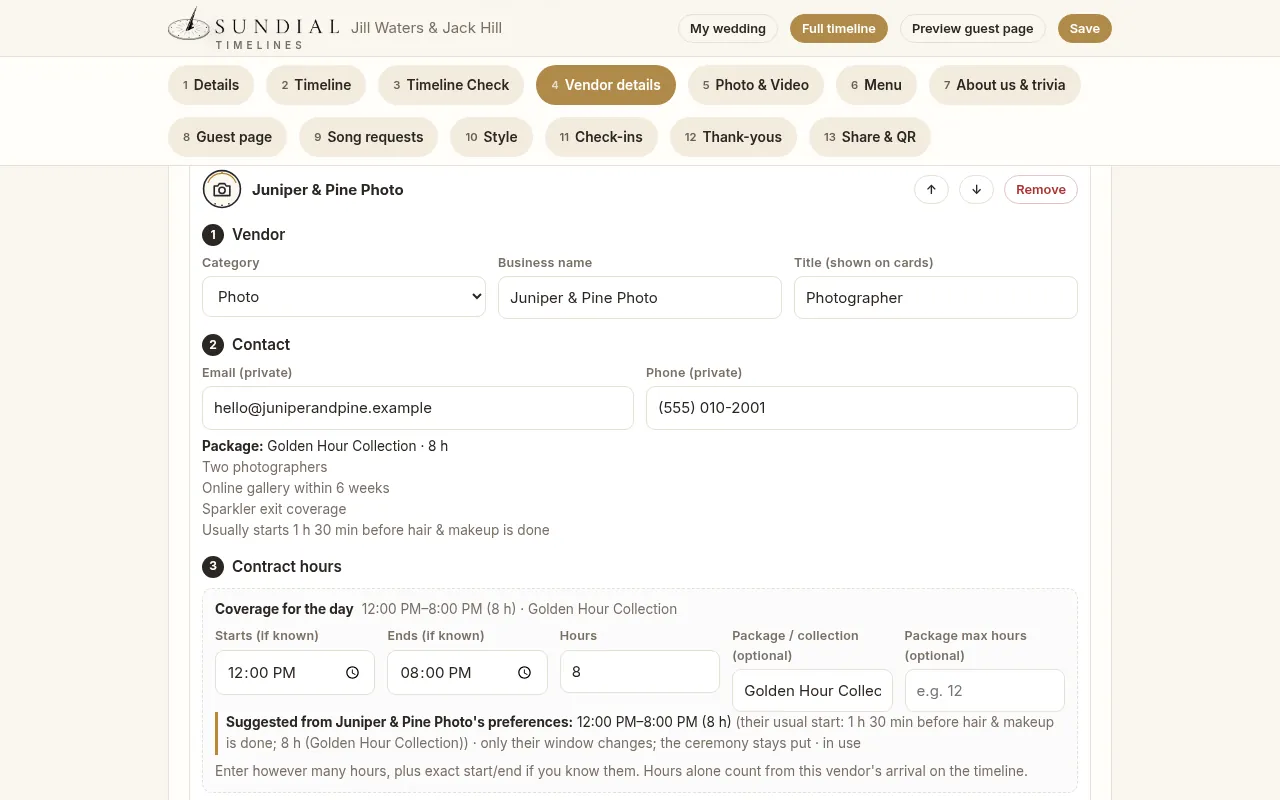
Enter basic vendor details. Share vendor-specific links in one tap.
- 1Add the vendorPick “Photographer.” The title fills in.
- 2Their contactName, email, phone. Private: never on the guest page.
- 3Contract hoursLike “8 hours · Golden Hour Collection.” Sundial suggests their window.
- 4Send linksEach vendor gets only their part. Copy or text it. On Pro and Team, Sundial can email it.
Simple by default. Fully customizable underneath.
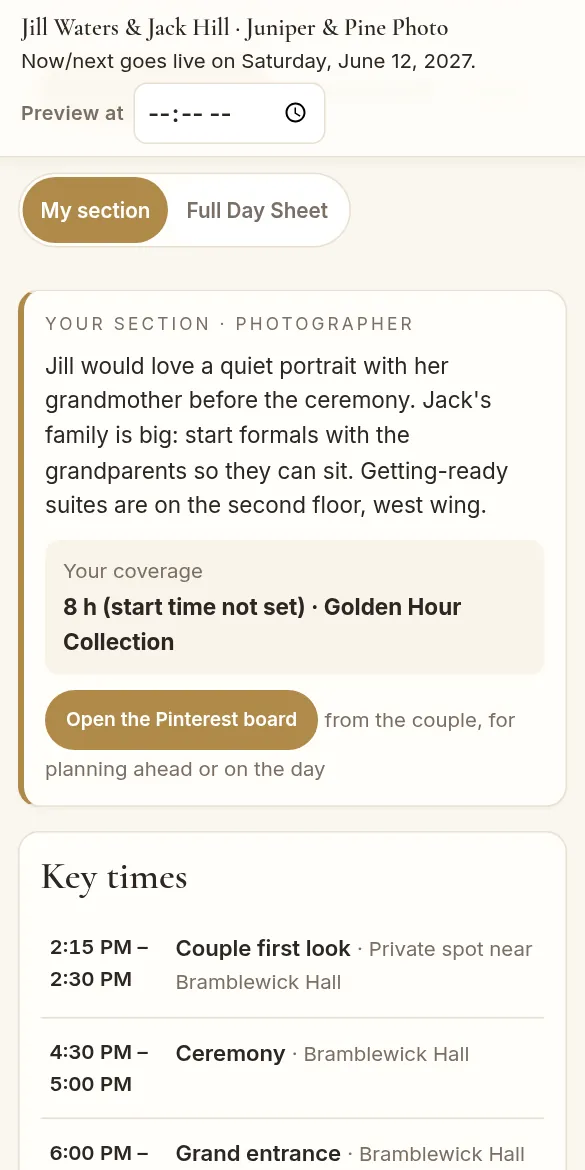
Their part of the day, on their phone
Screens from the real app, shown with a fictional wedding: Jill & Jack at Bramblewick Hall.
Easy by default
Sundial fills it in for you.
- Check in in secondsScan the QR when you arrive. No app, no login.
Learn more
Just your name, role and a phone number. It takes about ten seconds.
- The couple knows you’re thereYour check-in shows up on their Day Sheet right away.
Learn more
The couple and planner see it live, with optional browser notifications and email alerts. No more “is the photographer here yet?” texts.
- Your own linkYour notes, your hours and the key times.
Learn more
Notes written just for you, from load-in details to the surprise letter you’re handing over. The full Day Sheet is one tap away.
- One live Day SheetAlways the latest times.
Learn more
It updates the moment the planner changes a time.
- Your packages, filled inSave them once. They show up on every timeline.
Learn more
When a couple or planner adds you and says yes to linking you, Sundial fills in your hours and suggests your window around their ceremony.
- Save it or print itTap “I’m a vendor on this wedding,” or download a PDF.
Learn more
Saving adds the wedding to your free vendor account.
- Your year, trackedEach check-in adds the wedding to My year.
Learn more
You get the date, the couple’s first names, the venue and city. See weddings per month, your busiest month, this year and in total, plus your top venues and the vendors you work with most, ranked.
- Client timelines, draftedAnswer a few questions. Get a real day, golden hour included.
Learn more
Sundial drafts around the ceremony and sunset. Drag to rearrange; the ceremony stays put.
- Coming soonHome base and mileageDistance to each venue for your gas-mileage log.
Learn more
Set your home or office, and Sundial works out the distance to each venue.
Customize everything
For pros who want it their way.
- Custom titlesUse the title that fills in, or write your own.
- Rename or hide any sectionA toggle to hide anything.
- Notes for one vendorPer-vendor notes and Pinterest boards.
Learn more
Each vendor sees only the notes meant for them.
- Coverage your wayArrival, wrap and package hours.
Learn more
Sundial suggests times from the timeline. The couple decides whether to share them.
- Your start timeTell Sundial when you like to start.
Learn more
Like 1 h 30 min before hair & makeup is done. Saved once with your packages.
- Send it your wayCopy, text or email each link.
Learn more
Copy or text a link on any plan. On Pro and Team, Sundial can email it for you.
- Filter by roleSee just your part of the day.
- Photo and video shot listFamily groups, must-have shots and requests.
Learn more
Check them off as you go.
- Guest page and QR signsSchedule, menu, story and quiz for guests.
Learn more
Plus print-ready QR signs for the day.
Timelines you create need a plan: Solo, Pro or Team. Checking in and My year are always free.
Sundial Showcase Coming soon
You could be featured here: we pull top-rated vendors and exciting newcomers.
Not open yet. Rankings will come from real ratings, so no one is ranked or featured today. Add your packages now to be ready.
Ready for your next wedding?
Create your free account now, then check in at your next Sundial wedding to start your year.
Create your free vendor account